Role : UI/UX & Product Design

Dog owners struggle to find reliable information on pet care, training, health, and socialization, often navigating multiple platforms for guidance.
"How might we design an intuitive app that centralizes essential dog care resources, offering a one-stop solution to help owners provide the best for their pets?"


Project Overview
My role:
UX Designer & Researcher
Project duration:
November 2024 – January 2025
The product:
BARKbook is a pet-friendly social platform where pet owners, vets, and volunteers connect, share, and access pet care resources. Users can create pet profiles, find similar breeds, book vets, and organize events, fostering an engaging and supportive pet community.
The problem:
During the BARKbook project, I aimed to solve the challenge of helping pet owners easily connect with veterinarians, find similar breeds, and organize pet-related events. Along the way, I refined the design to improve usability, accessibility, and seamless navigation, ensuring a smoother experience for users.
The goal:
The goal of the BARKbook project was to create an intuitive and engaging platform where pet owners could easily manage pet profiles, connect with vets, and interact with a like-minded community. Throughout the process, the focus was on enhancing usability, accessibility, and seamless navigation to ensure a user-friendly experience.
Responsibilities:
Conducted user research to identify pet owners' needs and improve user engagement.
Designed wireframes and prototypes to establish intuitive navigation and layout structure.
Developed high-fidelity UI designs with a focus on accessibility, usability, and visual consistency.
Performed usability testing and iterations to refine interactions and enhance user experience.
Created interactive features for vet consultations, breed connections, and event organization to foster community engagement.
Understanding the User
User research: summary
I conducted user research focusing on pet owners, pet care enthusiasts, and animal welfare volunteers to understand their needs, preferences, and pain points. I initially assumed that most users would primarily be interested in socializing their pets and learning about similar breeds. However, the research revealed a broader set of needs: many users expressed a strong desire for features like Organizing events, volunteer assistance and connecting with similar breeds. This feedback shifted my assumptions, emphasizing the importance of practical, community-driven tools alongside social features. The research underscored the need for a comprehensive platform that not only connects pet owners but also provides resources for pet care and support, which ultimately shaped BarkBook’s final design and functionality.
-
User research: pain points
Users find it time-consuming to enter detailed pet information during the profile setup process.
Reflection :
To address this, I will streamline the onboarding process by creating an easy-to-navigate, multi-step form with optional fields and visual cues, making it less overwhelming. This design approach will allow users to complete the profile at their own pace without feeling pressured.
Users are concerned about privacy, especially when sharing pet and owner location details.
Reflection :
Privacy features will be prioritized by including customizable privacy settings that allow users to control which information is visible to others. This will be highlighted in the UI to assure users that their data is protected and build trust in the platform.
Users have difficulty finding breed-specific information and connecting with other pet owners of similar breeds.
Reflection :
I’ll incorporate an advanced search and filtering system for breeds and interests to help users easily find and connect with relevant profiles. Additionally, I’ll create breed-specific community spaces where users can share and access information specific to their pet's breed.
Users feel overwhelmed by managing different features like organizing an events and volunteer requests in one place.
Reflection :
To simplify navigation, I’ll implement clear and distinct tabs for each major feature (like “organising an event”, "Volunteer Support") and use icons and color-coding to make these sections easily identifiable. This structure will help users quickly access the feature they need without feeling overwhelmed.
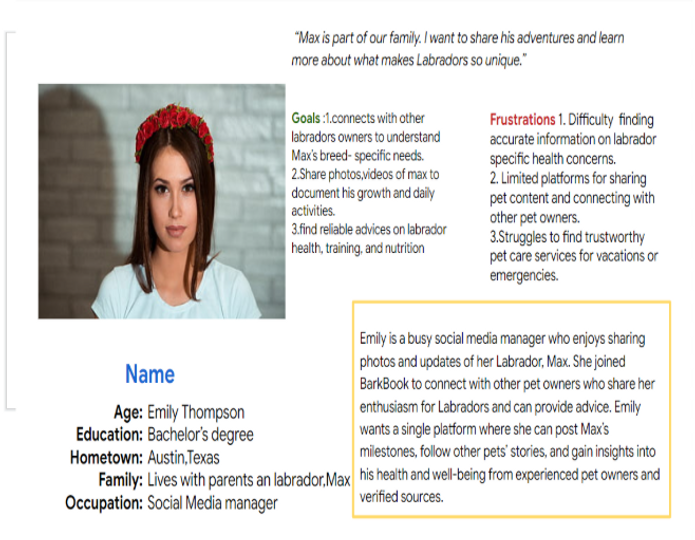
Persona
Problem Statement
Emily is a social media manager and Labrador owner who needs a reliable platform to connect with other Labrador owners and share pet-related content because she wants trustworthy advice, pet care services, and a community to document Max’s growth.
User journey map
BarkBook is a social platform for pet owners to create profiles for their pets, connect with others, and share experiences. The app supports community building through features like volunteer help for pet care. The main goal is to provide a user-friendly space that brings pet lovers together for support, socializing, and sharing resources.


Paper wireframes


Digital wireframes
BarkBook provides pet owners with direct access to licensed vets for expert health advice, breed-specific care, and emergency support via chat or video calls. Users can track wellness, book appointments, and get trusted recommendations tailored to their pet’s needs. A vet verification system ensures reliability, while community reviews help users find the best professionals. This feature makes pet healthcare simple, accessible, and trustworthy.

Digital wireframes
BarkBook allows pet owners to connect with others who have the same breed, making it easier to share experiences, training tips, and health insights. Users can join breed-specific communities, ask questions, and get advice tailored to their pet’s unique needs. This feature helps build a supportive network for learning, sharing, and bonding over common pet experiences.

Low-fidelity prototype

Usability study: findings
The usability study was conducted to evaluate the user experience of BarkBook’s low-fidelity prototype, focusing on navigation, functionality, and overall ease of use. Feedback from participants provided insights into areas that need improvement before moving to high-fidelity design. short introduction to the usability studies you conducted and your findings.
Round 1 findings
Round 2 findings
Navigation Confusion
Improved Navigation Flow
Unclear Icons & Labels
Refinement of Search Filters
Account Creation Flow
Event Organization Clarity
Mockups
Before the usability study, BarkBook had a structured but less intuitive layout, with colors, buttons, and navigation that needed refinement for better usability. After the study, improvements were made to enhance user experience—layout adjustments for better hierarchy, optimized colors for readability, repositioned buttons for accessibility, and streamlined navigation for a smoother flow. These updates created a more engaging and user-friendly interface.

Mockups
Before the usability study, BarkBook had a basic structure with less intuitive navigation and visual elements. After the study, layout refinements, improved color contrast, repositioned buttons, and a clearer navigation flow made the interface more user-friendly and engaging.

Mockups


High Fedility Prototype
